> ## Documentation Index
> Fetch the complete documentation index at: https://docs.getimpala.ai/llms.txt
> Use this file to discover all available pages before exploring further.
# Impala Leap
> Impala Leap swaps model weights in seconds, with no redeploy. Upload a checkpoint, reload it, and the running fleet serves it.
**Impala Leap** changes the weights a running deployment serves, in seconds, without a redeploy. You upload a checkpoint, trigger a reload, and the fleet starts serving the new weights on the same endpoint, through the same engine ([Impala Herd](/impala-herd)).
Use Leap when you retrain or fine-tune on your own cadence and need the serving fleet to follow — RL loops, post-training iteration, or any workflow where new weights ship more often than new infrastructure.
## Endpoints
Impala splits inference from management. Inference runs on the OpenAI-compatible surface; Leap is an Impala-specific operation and lives under `/imp/v1`.
| Method | Path | Purpose |
| ------ | ------------------------ | ----------------------------------------- |
| `POST` | `/imp/v1/weights/upload` | Stage a checkpoint from your S3 bucket |
| `POST` | `/imp/v1/weights/reload` | Swap the staged checkpoint onto the fleet |
| `GET` | `/imp/v1/weights/status` | Current state of the sync |
Base URL: `https://inference.getimpala.ai`. The OpenAI-compatible endpoints sit alongside at `/open-ai/v1/`.
Authentication is the same bearer token you use for inference.
## How a sync progresses
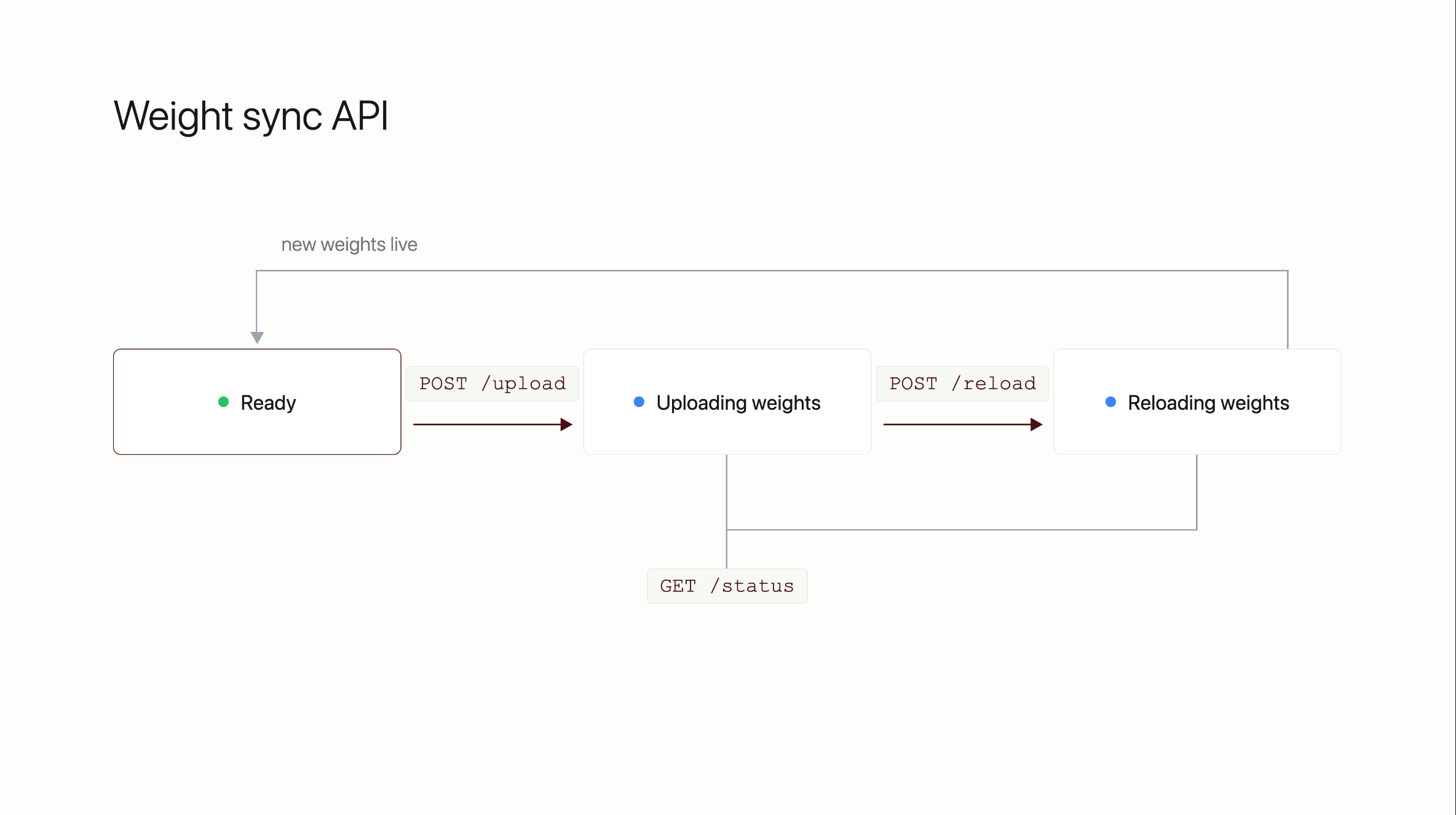 `GET /imp/v1/weights/status` is valid at any point and reports which state the fleet is in.
**Ready** — serving current weights, nothing in flight.
**Uploading weights** — the checkpoint is transferring from your bucket. Serving continues on the old weights.
**Reloading weights** — engines are swapping to the new checkpoint.
**Back to Ready** — the new weights are live.
Upload is the long step and scales with checkpoint size and available bandwidth. The reload itself is fast by comparison.
## Uploading a checkpoint
Both `upload` and `reload` take a map of model identifier to S3 URI, so a fleet serving more than one model can be updated per model.
```bash theme={null}
curl -X POST https://inference.getimpala.ai/imp/v1/weights/upload \
-H "Authorization: Bearer $IMPALA_API_KEY" \
-H "Content-Type: application/json" \
-d '{
"weights": {
"": "s3://your-bucket/checkpoints/2026-08-20/"
}
}'
```
Poll until the upload completes:
```bash theme={null}
curl https://inference.getimpala.ai/imp/v1/weights/status \
-H "Authorization: Bearer $IMPALA_API_KEY"
```
## Reloading
```bash theme={null}
curl -X POST https://inference.getimpala.ai/imp/v1/weights/reload \
-H "Authorization: Bearer $IMPALA_API_KEY" \
-H "Content-Type: application/json" \
-d '{
"weights": {
"": "s3://your-bucket/checkpoints/2026-08-20/"
}
}'
```
Poll `/status` until the fleet returns to `Ready`, then send a test request through your normal inference endpoint to confirm the new weights are answering.
## Things to know
**The checkpoint has to be loadable onto the running engines.** A checkpoint whose architecture or quantization differs from what the fleet is serving cannot be hot-swapped; it needs a new deployment. Impala validates this from the checkpoint's `safetensors` metadata before reloading.
**Failed steps retry automatically**, up to three attempts, before the sync is reported as failed.
**Give Impala read access to the bucket** holding your checkpoints before your first sync.
## Need help?
Reach out to your Impala contact directly.
`GET /imp/v1/weights/status` is valid at any point and reports which state the fleet is in.
**Ready** — serving current weights, nothing in flight.
**Uploading weights** — the checkpoint is transferring from your bucket. Serving continues on the old weights.
**Reloading weights** — engines are swapping to the new checkpoint.
**Back to Ready** — the new weights are live.
Upload is the long step and scales with checkpoint size and available bandwidth. The reload itself is fast by comparison.
## Uploading a checkpoint
Both `upload` and `reload` take a map of model identifier to S3 URI, so a fleet serving more than one model can be updated per model.
```bash theme={null}
curl -X POST https://inference.getimpala.ai/imp/v1/weights/upload \
-H "Authorization: Bearer $IMPALA_API_KEY" \
-H "Content-Type: application/json" \
-d '{
"weights": {
"": "s3://your-bucket/checkpoints/2026-08-20/"
}
}'
```
Poll until the upload completes:
```bash theme={null}
curl https://inference.getimpala.ai/imp/v1/weights/status \
-H "Authorization: Bearer $IMPALA_API_KEY"
```
## Reloading
```bash theme={null}
curl -X POST https://inference.getimpala.ai/imp/v1/weights/reload \
-H "Authorization: Bearer $IMPALA_API_KEY" \
-H "Content-Type: application/json" \
-d '{
"weights": {
"": "s3://your-bucket/checkpoints/2026-08-20/"
}
}'
```
Poll `/status` until the fleet returns to `Ready`, then send a test request through your normal inference endpoint to confirm the new weights are answering.
## Things to know
**The checkpoint has to be loadable onto the running engines.** A checkpoint whose architecture or quantization differs from what the fleet is serving cannot be hot-swapped; it needs a new deployment. Impala validates this from the checkpoint's `safetensors` metadata before reloading.
**Failed steps retry automatically**, up to three attempts, before the sync is reported as failed.
**Give Impala read access to the bucket** holding your checkpoints before your first sync.
## Need help?
Reach out to your Impala contact directly.